A free, connected toolkit and a community for building and maintaining design systems. UI Organized brings the whole loop together: tokens, theming, a Figma source, a published component library, and the tooling that keeps every layer in sync.
Design-system and design tooling today is scattered across separate products, and the good ones are either piecemeal or paywalled. Solo designers, students, and especially open-source software maintainers lack a free, connected toolkit and a community to support design work.
UI Organized is a marketing site, a browser-based theme builder, a community space, and a set of Figma plugins. The theme builder pairs a color configurator, a typography configurator, and icon scaling and setup. The Figma plugins cover a color palette generator, an icon scaler, theme import, and data visualization, each one closing a gap between a designer’s intent and a developer’s implementation.
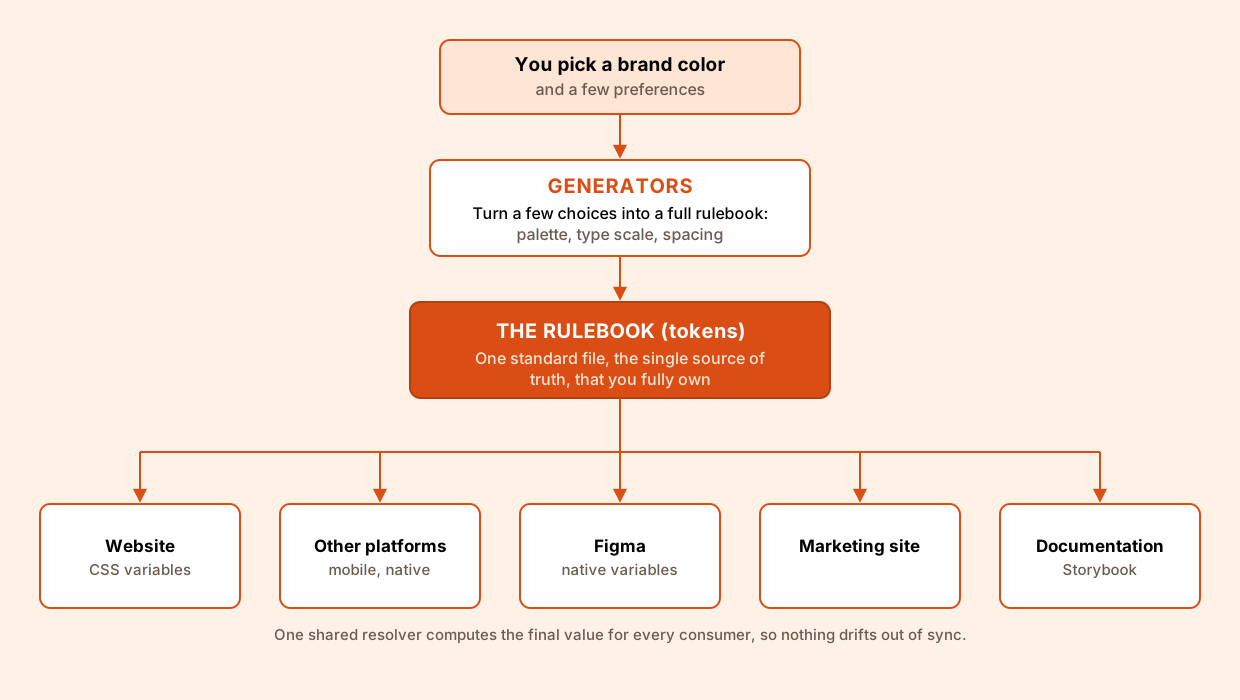
Because every layer reads from the same rulebook, customization happens in one place and flows everywhere. You can let the generators build a full system from a single brand color, or hand-author and import your own tokens and edit any value directly, since the output is plain, standard data with no lock-in. Themes, sub-brands, and light or dark modes are just different rulebooks, references resolve through one shared engine so nothing drifts, and the same tokens export to CSS, Figma, or any other platform. The result is deep customization at every level without ever trading away consistency.
What I built
The design system, the theme builder and the marketing site are three separate pieces of work that all read from the same tokens. Each has its own page below.
The front door and the docs, both reading from the same tokens the library ships.
Community & open source
UI Organized is free and open source, not a paywalled product with a thin free tier. The whole thing, the theme builder, the Figma plugins, and the token engine, is built in the open and self-hostable, so you own your data and never depend on a vendor’s cloud. Contribution is open to both sides of the craft: designers can shape the presets, the Figma workflows, and the documentation, while developers can extend the generators, the resolver, and the platform exports. The harder and more interesting goal is designing for contributors and not just users, since an open-source project lives or dies on its contribution workflows, onboarding, and docs.
Anyone can pitch an idea straight from the site through a contribute form. Each submission is filed automatically as an entry on the project’s GitHub board, and once work actually starts on an idea, the site’s progress dashboard updates on its own to reflect it. That keeps the roadmap transparent, shows contributors where their idea stands, and makes the project’s momentum and impact visible to everyone.
Reflection
I work on design systems professionally, but only on the design side. UI Organized is a chance to own the entire loop solo, defining tokens, authoring the Figma source, publishing the code library, and building the tooling that keeps those layers in sync. Alongside that, it’s an exercise in building a community: open source lives or dies on contribution workflows, documentation, and onboarding, so I want to learn to design for contributors, not just users. Underneath both is the meta-layer I care about most, designing the systems and tools that shape how everyone else designs.